


Adobe Dreamweaver CC for Teams
In stock
Short Description
- Model: Dreamweaver CC
- Fast, flexible coding
- Set up to site up in fewer steps
- Seamless Live View editing
- Multi-monitor support for Windows
66,715৳ 73,387৳
In stock
Adobe Dreamweaver CC for Teams – Streamline Web Design and Development with Collaborative Tools
The Adobe Dreamweaver CC for Teams is a powerful web design and development tool designed for web designers, developers, and creative teams who need to build responsive websites and web applications with precision, flexibility, and innovation. With features like real-time collaboration , code editing tools , live preview , and seamless integration with Adobe Creative Cloud, Dreamweaver empowers teams to streamline workflows, enhance productivity, and deliver high-quality web projects. Whether you’re designing responsive layouts, coding dynamic websites, or managing large-scale web applications, this software provides everything you need to bring your ideas to life. Available exclusively at Best Computer Hub , this solution is your gateway to unlocking professional-grade web development tools tailored for modern collaborative environments.
Key Features of Adobe Dreamweaver CC for Teams
- Real-Time Collaboration: Work seamlessly with team members on the same project using cloud-based tools.
- Code Editing Tools: Use advanced coding tools for HTML, CSS, JavaScript, and more.
- Live Preview: Test changes in real-time with live previews across multiple devices.
- Cloud Integration: Store and share files securely using Adobe Creative Cloud.
- Responsive Design Tools: Create websites that adapt seamlessly to any screen size.
- Customizable Workspaces: Tailor the interface to match your workflow preferences.
- Ongoing Updates and Support: Receive regular updates, bug fixes, and technical support throughout your subscription.
Why Choose Adobe Dreamweaver CC for Teams?
The Adobe Dreamweaver CC for Teams isn’t just another web design tool—it’s a comprehensive solution tailored for professionals who demand creativity, scalability, and collaboration. Here’s why it’s essential:
1. Real-Time Collaboration
Work simultaneously with teammates on the same project without worrying about version conflicts. Real-time collaboration ensures that everyone stays aligned and informed throughout the development process.
2. Code Editing Tools
Use advanced coding tools for HTML, CSS, JavaScript, and other languages. Features like syntax highlighting , auto-completion , and error detection ensure precise control over your code.
3. Live Preview
Test changes in real-time with live previews across multiple devices. Ensure your website looks great and functions flawlessly on desktops, tablets, and smartphones.
4. Cloud Integration
Store and share files securely using Adobe Creative Cloud. Access your projects from anywhere and collaborate with teammates in real-time, ensuring smooth communication and alignment.
5. Responsive Design Tools
Create websites that adapt seamlessly to any screen size. Use CSS Grid , Flexbox , and media queries to design layouts that look great on all devices.
6. Customizable Workspaces
Tailor the interface to match your workflow preferences. Customize tool palettes, menus, and shortcuts to streamline repetitive tasks and improve efficiency.
7. Ongoing Updates and Support
With an annual subscription, you’ll receive regular updates, new features, and technical support directly from Adobe. Stay ahead of the curve with access to the latest innovations and performance improvements.
Why Choose Best Computer Hub?
Best Computer Hub is your ultimate destination for premium tech products, including the Adobe Dreamweaver CC for Teams . Here’s why customers trust us:
- Authentic Products: Direct sourcing from authorized distributors ensures genuine software licenses.
- Competitive Pricing: Exclusive deals, discounts, and bundle offers for unbeatable value.
- Expert Support: Assistance with setup, troubleshooting, and performance optimization.
- Hassle-Free Shopping: Secure online ordering at Best Computer Hub or in-store demos at our showrooms.
What is the Price of Adobe Dreamweaver CC for Teams in Bangladesh?
The price of the Adobe Dreamweaver CC for Teams varies based on availability and licensing options. Visit our Software Category or contact our showrooms for real-time pricing and customization options.
Stay Connected with Best Computer Hub
📲 Get updates on deals, launches, and tech tips:
👉 Facebook
👉 X (formerly Twitter)
👉 LinkedIn
👉 [YouTube](https://www.youtube.com/ @bestcomputerhubltd)
Empower Your Web Development Workflow Today!
The Adobe Dreamweaver CC for Teams is your key to enabling fast, accurate, and professional web design and development for all your needs. Order now and ensure your creative experience is seamless—only at Best Computer Hub !
Detailed Benefits of Choosing Adobe Dreamweaver CC for Teams
1. Real-Time Collaboration
- Simultaneous Editing: Work on the same project with multiple team members in real-time.
- Conflict-Free Workflow: Avoid version conflicts and ensure everyone stays on the same page.
- Efficient Communication: Share feedback and updates instantly to speed up the development process.
2. Code Editing Tools
- Syntax Highlighting: Identify errors and structure your code with ease.
- Auto-Completion: Save time with intelligent suggestions for HTML, CSS, and JavaScript.
- Error Detection: Catch mistakes early with built-in debugging tools.
3. Live Preview
- Cross-Device Testing: Test your website on multiple devices to ensure responsiveness.
- Real-Time Feedback: See changes instantly without refreshing your browser.
- Polished Results: Deliver error-free websites that look great on all platforms.
4. Cloud Integration
- Secure Storage: Store and share files securely using Adobe Creative Cloud.
- Real-Time Access: Access your projects from anywhere, whether you’re in the office or on the go.
- Collaboration Made Easy: Share files with teammates and collaborate in real-time for faster project completion.
5. Responsive Design Tools
- Adaptive Layouts: Use CSS Grid and Flexbox to create layouts that adapt to different screen sizes.
- Media Queries: Add breakpoints to ensure your designs look great on all devices.
- Time-Saving: Reduce manual effort by automating responsive design tasks.
6. Customizable Workspaces
- Tool Palettes: Organize frequently used tools for quick access.
- Keyboard Shortcuts: Customize shortcuts to streamline repetitive tasks.
- Workspace Profiles: Save and switch between different workspace configurations.
7. Ongoing Updates and Support
- Feature Updates: Stay ahead with access to new tools and functionalities.
- Bug Fixes: Resolve issues quickly with regular patches and updates.
- Technical Support: Get help whenever you need it with round-the-clock support from Adobe.
Who Should Buy Adobe Dreamweaver CC for Teams?
This software is ideal for:
- Web Designers: Create visually appealing and responsive websites with ease.
- Developers: Build dynamic websites and web applications with advanced coding tools.
- Creative Teams: Collaborate seamlessly on web projects and iterate quickly.
- Freelancers: Deliver high-quality websites for clients while maintaining flexibility and efficiency.
- Educational Institutions: Teach students the fundamentals of web design and development.
Technical Specifications
Comparison with Competitors
- vs. Visual Studio Code: Offers seamless integration with Adobe Creative Cloud and specialized tools for web designers, making it ideal for teams already using Adobe products.
- vs. Free Alternatives: Provides advanced features like real-time collaboration, live preview, and professional-grade tools not available in free tools.
- vs. Older Versions: Includes the latest features, performance enhancements, and compatibility with modern hardware.

| Specification | Details |
|---|---|
| Software Name | Adobe Dreamweaver CC for Teams |
| License Type | Team License |
| Platform | Windows, macOS |
| Subscription Type | Annual (Team) |
| Web Design | HTML, CSS, JavaScript, PHP Support |
| Code Editing | Syntax Highlighting, Code Hinting |
| Live Preview | Yes |
| Responsive Design | Yes |
| Integration | Adobe Creative Cloud, Git |
| FTP/SFTP Support | Yes |
| Collaboration Tools | Shared Libraries, Cloud Sync |
| System Requirements | Minimum 8 GB RAM, 4 GB disk space |
| Internet Requirement | Required for activation |
| Language Support | Multilingual |
Based on 0 reviews
Be the first to review “Adobe Dreamweaver CC for Teams”
Related products
-
Gaming Component, Desktop PC Component, PC Component, Power Supply Unit, Power Supply Unit, Thermaltake, Thermaltake
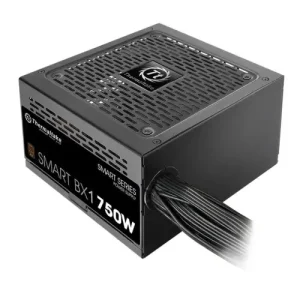
Thermaltake Smart BX1 750W 80+ Bronze Power Supply
 Gaming Component, Desktop PC Component, PC Component, Power Supply Unit, Power Supply Unit, Thermaltake, Thermaltake
Thermaltake Smart BX1 750W 80+ Bronze Power Supply
Short Description
- Model: Smart BX1 750W
- Capacity: 750W
- Form Factor: ATX
- Type: ATX 12V v2.3 and EPS v2.92
- Efficiency: 80 PLUS Bronze
SKU: PS-Thermaltake-002 -
Desktop PC Component, G.Skill, G.Skill, Gaming Component, PC Component, RAM, RAM-Desktop
G.Skill Trident Z Royal RGB 8GB DDR4 4600MHz Silver Heatsink Desktop RAM
-33% Desktop PC Component, G.Skill, G.Skill, Gaming Component, PC Component, RAM, RAM-Desktop
G.Skill Trident Z Royal RGB 8GB DDR4 4600MHz Silver Heatsink Desktop RAM
Short Description
- RAM Type – DDR4
- Bus Speed(MHz) – 4600MHz
- Number of Pin – 288 Pin
- CAS Latency – CL18-22-22-42
- LED Lighting – RGB
SKU: RAM-GSKILL-001































































































There are no reviews yet.