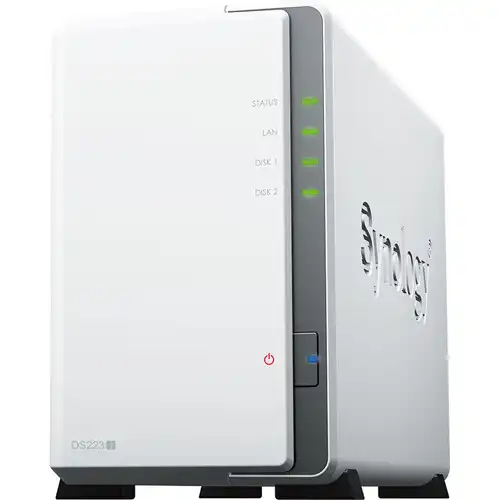
Top Synology NAS Storage Options for Small Business and Home Use in 2026
Synology NAS Storage In 2026 , data storage needs for small businesses and tech-savvy home users continue to grow rapidly. Whether you’re backing up critical business files, storing multimedia libraries, hosting shared documents, or managing personal data securely, the right NAS (Network Attached Storage) solution is vital. And when it comes to NAS devices, Synology NAS storage leads the market with powerful features, reliable performance, and unmatched versatility.
In this comprehensive guide, we’ll explore the top Synology NAS storage options ideal for small business and home use in 2026. We’ll also highlight how pairing a NAS with the Best Computer systems enhances productivity, performance, and data management.
Table of Contents
Why Synology NAS Storage Is the Go-To Choice in 2026
Synology has become a household name in NAS solutions for a reason: it combines user-friendly software with powerful hardware designed to meet a wide range of needs. Here’s why Synology NAS storage is a top choice in 2026:
✔ User-Friendly Operating System — DiskStation Manager (DSM)
Synology’s DSM interface is intuitive, rich with features, and continually updated. The operating system makes it easy for even non-technical users to configure and manage storage.
✔ Scalability & Flexibility
Synology NAS devices scale with your needs. From basic 2-bay units to large expandable systems, there’s a model for every requirement.
✔ Robust Data Protection
With built-in RAID, snapshot replication, and integrated backup tools, Synology NAS storage prioritizes data protection — a must for business continuity.
✔ Advanced Applications
Synology offers software for media streaming, business collaboration tools, virtualization support, and cloud sync — making NAS devices more than just storage boxes.
✔ Strong Community & Support
Synology boasts an active user community and excellent customer support, ensuring assistance is always available.
How “Best Computer” Enhances Your NAS Setup
A NAS device doesn’t work in isolation — the devices accessing it matter too. Pairing your Synology NAS storage with the Best Computer systems unlocks its full potential:
📌 Why Best Computer Matters
- Faster data transfer speeds when moving large files
- Smooth performance when accessing shared network storage
- Better experience when running NAS-linked apps (editing video/photo files, backups, virtualization tools)
- Enhanced multi-tasking during data sync, backup, and media streaming
💻 Recommended Specs for the Best Computer to Use with Synology NAS
✔ Multi-core processor (Intel i5 / Ryzen 5 or higher)
✔ 16GB RAM or more for optimized handling of large datasets
✔ Fast SSD storage for local caching & editing
✔ Gigabit (or Multi-Gigabit) network adapter
✔ Dual-monitor support for efficient multitasking
Having the Best Computer working alongside your Synology NAS setup means faster workflows, better backups, and seamless multimedia experiences — whether at home or in a small business environment.
Top Synology NAS Storage Options in 2026
Below, we explore the best Synology NAS storage models for small business and home use — selected for their performance, features, value, and future-ready capabilities.
🥇 1. Synology DS224+ — Best Compact NAS for Home & Small Office
The Synology DS224+ is one of the best entry-to-mid-range NAS options available in 2026. It’s ideal for users who need reliable storage without complexity.
Key Features:
- 2 bays for up to 32TB total storage
- Intel Celeron quad-core processor
- 2GB DDR4 RAM (expandable)
- Dual Gigabit Ethernet
- Synology DSM software with apps for multimedia, backups, and sharing
Best Use Cases
✔ Personal & family storage
✔ Photo/video backup and streaming
✔ Small business file sharing and collaboration
Why It’s Great
With its combination of performance, price, and ease of use, the DS224+ remains a top choice for users who want powerful NAS features without the complications of enterprise storage.
Tip: Pair this NAS with a powerful Best Computer with SSDs and high-speed backups enabled — especially if you regularly archive large media files.
🥈 2. Synology DS924+ — Best All-Around NAS for Small Businesses
The Synology DS924+ stands out as one of the most complete NAS solutions for serious small business users.
Key Features:
- 4 bays for flexible RAID configurations
- AMD Ryzen R1600 dual-core processor
- 4GB DDR4 RAM (expandable up to 32GB)
- Dual 1GbE + optional 10GbE expansion
- SSD caching support
Best Use Cases
✔ Multi-user file storage
✔ Virtual machine hosting
✔ Intensive multimedia handling
Why It’s Great
With its additional drive bays and expandability, the DS924+ is perfect for companies that want room to grow. Its robust hardware and software make it an unbeatable all-around Synology NAS storage option.
Tip: With four bays, you can configure RAID 5 for optimal balance between data protection and usable storage.
🥉 3. Synology DS1522+ — Best for Growing Businesses & Prosumer Users
The Synology DS1522+ is a powerful 5-bay NAS built for businesses with demanding storage needs.
Key Features:
- 5 drive bays with 4, 6, or 10 GbE options
- AMD Ryzen V1500B quad-core CPU
- 8GB DDR4 RAM (expandable up to 32GB)
- PCIe expansion for 10GbE or NVMe cache
- Highly scalable and versatile
Best Use Cases
✔ Multi-user collaboration environments
✔ Backup and disaster recovery plans
✔ Higher capacity media libraries
Why It’s Great
This model bridges the gap between small business NAS and more complex enterprise setups — making it ideal for prosumers and rapidly growing organizations.
Tip: Use SSD caching for faster performance when serving multiple simultaneous users.
🏅 4. Synology DS1823+ — Best for Large Data Needs
Need massive storage in a compact footprint? The Synology DS1823+ delivers eight bays of storage and future-proof architecture.
Key Features:
- 8 drive bays with RAID options up to RAID 6
- AMD Ryzen V1500B CPU
- 8GB DDR4 RAM (expandable)
- Optional 10GbE network expansion
- Hot-swappable drives and scalable architecture
Best Use Cases
✔ Office central storage
✔ Backup repositories
✔ Internal collaboration and document management
Why It’s Great
With eight bays and robust performance, this NAS is designed for medium businesses needing large capacity, redundancy, and scalability.
Tip: Combine this NAS with the Best Computer for rapid file editing workflows — perfect for design, video production, and engineering teams.
⭐ 5. Synology DS423 — Best Budget NAS for Home Users
If you want an affordable Synology NAS storage solution for home use, the DS423 is one of the most cost-effective choices.
Key Features:
- 2 drive bays with scalable storage
- Energy-efficient ARM CPU
- 2GB RAM
- DSM features for backups, cloud sync, and entertainment apps
Best Use Cases
✔ File and media sharing at home
✔ Family backups
✔ Basic personal cloud storage
Why It’s Great
Despite its budget pricing, the DS423 offers essential DSM functionality with reliable performance. It’s perfect for everyday home storage needs.
Tip: Pair it with a Best Computer equipped with high-speed network cards for faster transfers.
Choosing the Right Synology NAS Storage for Your Needs
When picking a NAS, ask yourself:
📌 1. How Much Storage Do You Need?
- Home users with photos/videos → 2-4 bays
- Small business with multi-user access → 4-8 bays
- Prosumer with virtualization or heavy multimedia → 5-8+ bays
📌 2. What Performance Level Is Required?
- Basic backups → Entry level (DS423, DS224+)
- Performance + scalability → Mid range (DS924+, DS1522+)
- Enterprise-level workflows → High end (DS1823+)
📌 3. Networking Features
If you plan on heavy file sharing, consider models with 10GbE support — or use an add-on network card. This helps especially when paired with a Best Computer that also supports faster throughput.
🛠 Essential Tips for Maximizing Your Synology NAS Storage
✔ Enable Scheduled Backups
Data loss can happen to anyone. Always configure regular backups — both locally and to the cloud — to ensure redundancy.
✔ Use RAID Appropriately
RAID helps protect against drive failure, but it isn’t a replacement for backups. Choose the RAID level (RAID 1, 5, 6) that matches your balance between capacity and redundancy.
✔ Enable SSD Caching
If your NAS supports it, SSD caching can dramatically improve performance for frequent file access.
✔ Monitor Health and Alerts
Use DSM to monitor drive temps, health status, and disk events — especially important for business continuity.
✔ Pair With the Best Computer
When the Best Computer is connected to your Synology NAS — especially over high-speed networks — data access and workflow speeds increase significantly. Whether editing 4K videos or running virtual machines, a fast computer + a powerful NAS make a perfect tech ecosystem.
NAS vs Cloud Storage — Why Synology NAS Still Matters in 2026
With cloud storage services like Google Drive, Dropbox, and OneDrive dominating the market, many users wonder if NAS still matters. The answer is a resounding YES — and here’s why:
🧠 Local Control Over Data
Unlike cloud storage providers, Synology NAS storage keeps your data under your control — without recurring monthly fees and with more privacy.
⚡ Faster Local Access
For large files and media, LAN access to a NAS is typically faster than cloud downloads.
💰 Cost Effectiveness
Over time, NAS systems can be more cost-efficient than paying yearly cloud subscriptions — especially for large data volumes.
📊 Advanced Features Beyond Storage
With apps like Synology Drive, Moments, Surveillance Station, and Virtual Machine Manager, your NAS becomes an all-in-one solution.
Final Thoughts — Synology NAS Storage for Everyone in 2026
In 2026, Synology remains the benchmark for NAS storage — offering reliable, scalable, and feature-rich solutions for both small business and home users. From affordable entry models to powerful multi-bay systems, there’s a Synology NAS for every budget and use case.
And when you pair your NAS with the Best Computer — equipped with fast processors, SSD storage, and high-speed networking — you unlock the true power of your storage environment. Whether you’re backing up files, streaming media, collaborating with your team, or securing digital memories, this combination delivers performance you can count on.
Choose wisely, plan for growth, and let Synology NAS storage future-proof your data infrastructure in 2026 and beyond.